Product principles
Junior Lawyer AI Is Now Inside Microsoft Word
The Junior Lawyer AI add-in is live on Microsoft Marketplace. Draft, refine, and translate legal documents in a side panel without leaving Word.
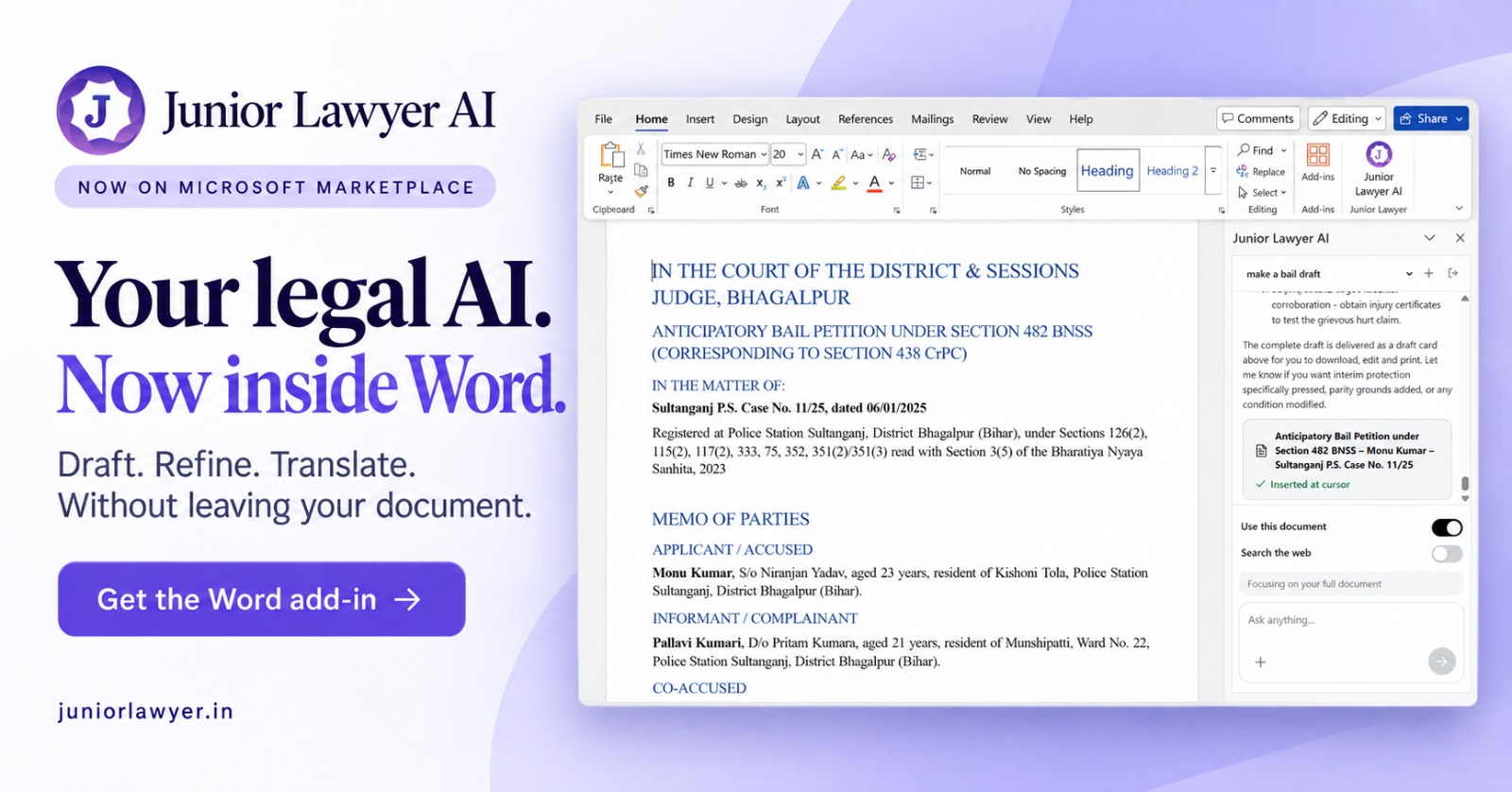
Most legal drafting in India still ends in the same place: a Word document. Petitions, replies, notices, agreements, and briefs are typed, tracked, and filed from Word, whatever tool helped along the way. That is why we built the next step of Junior Lawyer AI for the place where the work actually happens. Starting today, the Junior Lawyer AI add-in is available on Microsoft Marketplace, and it brings drafting, refining, and translation into a panel beside your document.
Why we built it for Word
Until now, using an AI assistant for legal work usually meant a round trip. You copied a paragraph out of your draft, pasted it into a browser tab, asked for changes, copied the answer back, and then fixed the formatting that broke on the way. Each hop costs a little time and a little attention, and across a working day it adds up. Worse, the assistant only ever saw the fragment you pasted, not the matter as a whole.
The add-in removes that round trip. Junior Lawyer AI sits in the Word ribbon, opens as a side panel, and works on the document you already have open. The draft stays where it was, in your formatting and your file, and the assistant works alongside it rather than somewhere else.
Draft: start from a request, finish in the document
Ask for what you need in plain language, such as "make a bail draft", and Junior Lawyer AI prepares a structured first draft. In the example above, it produced an anticipatory bail petition under Section 482 BNSS, with the corresponding Section 438 CrPC reference, laid out with the court heading, case particulars, memo of parties, and grounds in the order a practitioner expects.
The finished draft appears as a card in the panel. From there you can insert it at your cursor, and it lands in the document with its headings intact, ready to edit. You can also download it if you would rather work from a separate file. The panel also explains what the draft covers and suggests what to strengthen next, such as pressing interim protection, adding parity grounds, or tightening a particular condition.
Refine: work on what is already written
Much of a lawyer's day is spent improving a draft, not starting one. With Use this document switched on, the assistant reads your full document as context, so its suggestions fit the facts, parties, and sections already on the page. You can ask it to:
- Tighten or restructure a set of grounds or a prayer clause.
- Check consistency of names, dates, case numbers, and section references across the draft.
- Adapt an existing draft to a new set of facts without retyping the whole thing.
When you need more than the document, turn on Search the web so the assistant can look beyond the file. Leave it off when you want answers drawn only from the document in front of you.
Translate: stay in one window
Courts, clients, and records in India move between English and regional languages every day. Junior Lawyer AI can translate passages or whole sections inside Word, so a translated version can sit next to the source instead of in a separate tool. As with any legal translation, read the output against the original, especially for terms of art and names, before relying on it.
What stays the same
The add-in changes where you work with Junior Lawyer AI, not how carefully the work needs to be checked. Every draft is a starting point for your professional judgement. Verify statutory provisions and citations against current sources, confirm facts against the case record, and review the final document the way you would review a junior's work before it goes out. Junior Lawyer AI is designed to save you time on the first ninety percent, so you have more of it for the last ten.
Getting started
- Open Microsoft Word and go to Home > Add-ins (or Insert > Get Add-ins).
- Search for Junior Lawyer AI on Microsoft Marketplace and add it.
- Click Junior Lawyer AI in the ribbon to open the side panel, sign in, and ask for your first draft.
You can learn more and get started at juniorlawyer.in. We built this for the lawyers who told us they wanted AI help without leaving their documents, and we would love to hear what you draft with it first.