
Chronological events generated from selected documents
← All features
The case history, in order
Timeline
Turn a long case record into a chronology you can verify.
Build a dated chronology from case records with links back to the source pages.
Open Juniorlawyer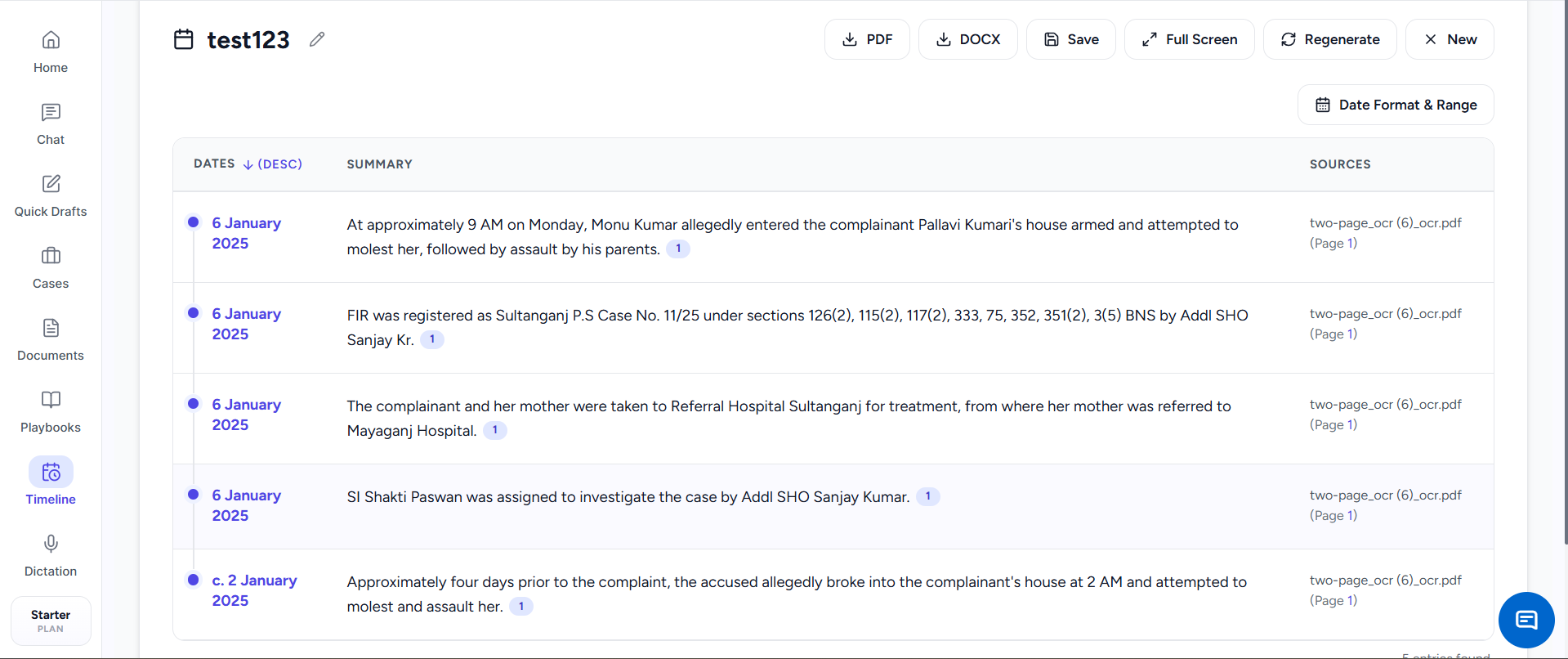
WHEN IT HELPS
Timeline in daily practice.
A case may contain years of events spread across an FIR, pleadings, orders and annexures. Timeline identifies dated events, arranges them in sequence and keeps the source visible so a lawyer can verify the record before using it.
A common situation
Before drafting or arguing, turn an FIR, chargesheet, orders and annexures into a chronological list. Review each event beside its date and return to the source page when a fact needs checking.
Understand a long record faster and trace every important date to its source.
CORE TASKS
What you can do.
Dates, summaries and source references in one view
Editable chronology ready for review and export
HOW TO USE IT
Three steps from source material to reviewed work.
Choose the record
Select the FIR, chargesheet, orders, pleadings or annexures that contain the case history.
Generate the sequence
Let Juniorlawyer identify dates and organize the related events in order.
Check every event
Review the summary against its source page, correct it and save or export the chronology.
COMMON USES
Where it fits into legal work.
Prepare dates for a bail or quashing matter
Understand a long procedural history
Create a hearing-ready list of dates
Review before use.
Check extracted text, translations, facts, authorities and generated documents before filing, advising or relying on them.